


KultureCity
4.657.00 Reviews
App Specs
- Version
- 6.2.2
- Updated On
- License
- Free
- Downloads
- 10,000+
- Developer
- KultureCity
- Categories
- Parenting
- Platform
- Android
Screenshots
 Analysis by AppCompare
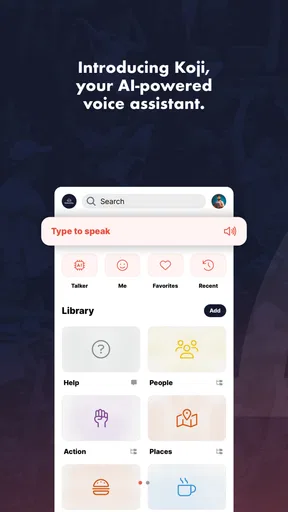
I approached KultureCity as a parent would approach any unfamiliar communication tool: with a specific problem in mind rather than curiosity alone. The app belongs to the parenting category, is made by KultureCity, and is designed around conversation support through an AI talker. Its central promise is simple, but using it well depends on how you prepare the conversation, how another person receives the message, and what you do when the first attempt does not work.
That makes this a more practical review than a quick look at a store page. I used it as a tool for starting communication, shaping an exchange, and helping a child or another person participate when ordinary speech is difficult. The biggest strength is that it gives a conversation somewhere to begin. It is not a replacement for patience, listening, or professional support, and it works best when an adult treats it as part of a wider routine rather than as an automatic solution.
From a difficult moment to a usable conversation
The starting condition matters. If a child is frustrated, overwhelmed, unable to find the right words, or simply more comfortable communicating through guided choices, opening an app is not enough by itself. I found that the adult’s first job is to reduce pressure. Instead of repeatedly asking, “What is wrong?”, I would frame the device as an invitation: we can use this together, take our time, and try another way.
That small change affects the whole experience. A talker can feel helpful when it gives someone control over what they want to express. It can feel demanding when an adult keeps tapping through options or expects an immediate answer. KultureCity is therefore most useful in calm preparation and supported interaction, not as a magic button during the peak of a meltdown.
The app is free, which removes one important barrier for families who want to test it before committing to a paid communication product. It is also rated for Everyone, so its intended audience is broad. Still, an age label should not be confused with suitability for every communication need. A toddler, an older child, and a person with a more complex communication profile may all approach the same tool differently.
Before relying on it outside the home, I would spend time learning the flow in a quiet room. Try a few familiar needs, such as food, rest, help, or a preferred activity. Notice how quickly the child understands the interaction and whether the adult can follow the result without taking over. This practice is more valuable than simply installing the app and waiting for a difficult situation to reveal its weaknesses.
Building the first message
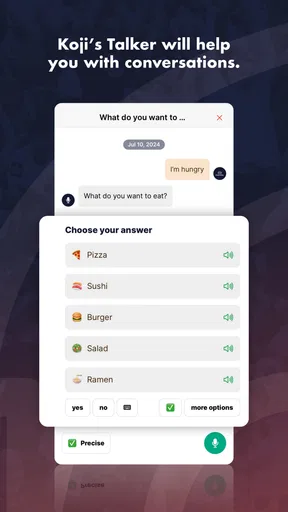
In everyday use, the conversation begins with an input: a selection, a spoken attempt, or another action that helps the user communicate an intention. The AI talker concept is useful here because it changes the adult’s role. Instead of guessing every need, I can watch for the person’s choice and respond to it. That creates a clearer handoff from the person communicating to the person listening.
Worth Reading Before You Choose

EA SPORTS FC Mobile 26 Is a Bigger Football Game, but It Takes Time

Flipboard Shows What News Apps Must Do Beyond the Feed

Switching to Android Auto Means Rethinking Your Driving Routine

Google Calendar Makes a Crowded Week Easier to Manage

Ludo King Makes the Most of the Minutes Between Plans

Baby Panda World Brings Quick Play to Modern Phones, but Its Game Library Feels Busy
One practical tip is to keep the first exchange narrow. If a child is upset, presenting too many possible directions can add work rather than remove it. I would start with a small question and wait. If the response is unclear, I would acknowledge the attempt before asking for more detail. The app can support the exchange, but the quality of the interaction still depends on the adult’s timing and restraint.
This is also where KultureCity differs from a standard voice assistant. A general assistant is usually built to answer commands, search, or perform tasks. A conventional messaging app assumes that the user can already compose and send a message. KultureCity sits closer to the communication process itself: its value is in helping a person take part in a conversation, not merely in completing a command.
That distinction is important for parents deciding what to try. If the need is a quick reminder, a calendar alert, or a spoken answer to a factual question, another app will probably be faster. If the need is to make an intention easier to express and easier for another person to understand, this app has a more relevant purpose.
The adult handoff is part of the feature
The first handoff is from the child or user to the adult. I would not treat the app’s output as the end of the message. I would repeat the meaning in natural language and check whether I understood correctly. For example, if the child indicates a need for a break, I might say, “You want to stop for a while?” That gives the user a chance to confirm without forcing them to rebuild the entire message.
The second handoff is from one adult to another. This matters in families, classrooms, waiting rooms, and outings where the person who begins the conversation may not be the person who can act on it. A parent may help a child express a need, then explain the result to a teacher, relative, or caregiver. The app helps with the first step, but the human explanation still carries the context: what happened before, what usually helps, and whether the person wants a choice or a direct response.
I found this workflow more reliable when the adult avoided speaking over the user. It is tempting to tap quickly, interpret immediately, and announce the answer. That may save seconds, but it can also turn a communication aid into an adult-controlled interface. Give the user time to initiate, then use your own words only to clarify or pass the message along.
A useful routine is to agree on a simple confirmation signal before leaving home. A nod, gesture, or repeated selection can show whether the message was understood. This is a small but important safeguard because an AI-supported talker may produce an understandable phrase while the intended meaning remains different. The app starts the exchange; confirmation completes it.
A realistic outing workflow
Imagine a family at a busy public place. The child becomes uncomfortable, but cannot explain whether the problem is noise, fatigue, hunger, or the need to leave. The parent opens KultureCity, stays beside the child, and offers a calm route into the conversation. The child makes a selection or uses the available talker interaction. The parent listens, repeats the likely meaning, and offers the next practical choice: move somewhere quieter, take a break, eat, or go home.
The outcome is not necessarily a perfect sentence. The useful result may be that the child communicates one piece of information before the situation escalates. That can be enough to change the parent’s response from guessing to supporting. If another caregiver is present, the parent can pass along both the expressed need and the context surrounding it.
This scenario also shows why the app should be tested before an outing. In a noisy environment, a child may have less patience, the adult may have less attention, and the phone may be harder to handle. A familiar routine reduces the number of decisions required at the moment when everyone has the least capacity for them.
I would also prepare a backup that does not depend on the app. A printed choice card, gesture, or familiar object can keep the conversation moving if the phone is unavailable or the interaction is too difficult. That is not a criticism unique to KultureCity; it is good planning for any digital communication aid. The important point is not to make one tool the only bridge between a person and the people around them.
What the result feels like in practice
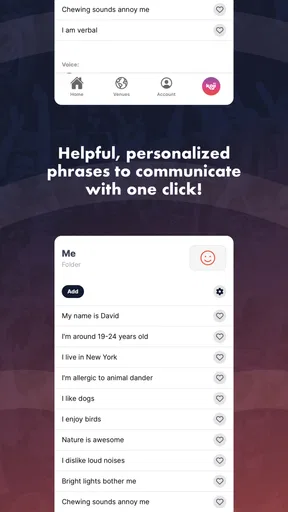
The result I value most is not speed. It is a reduction in guesswork. When the person using the app can indicate a need and the adult can respond to that indication, the exchange becomes more respectful. Even a short interaction can give the user a clearer role in deciding what happens next.
That benefit is especially noticeable when the adult is willing to wait. KultureCity does not remove the need to observe body language, mood, and context. It adds another channel. Sometimes the app-supported message will match what the adult already suspected; sometimes it will reveal a different need. Either way, the parent has more information than they had when relying only on assumptions.
The app’s adoption gives it a useful level of visibility for a specialist parenting tool. It has over ten thousand installs and an average rating of 4.6 from around 165 ratings, with about 57 written reviews. I read those figures as encouragement rather than proof that it will suit every family. A communication app can be excellent for one user and frustrating for another because needs, motor skills, language development, and tolerance for screens vary so widely.
I also appreciate that the product is not positioned as a luxury purchase. Since it is free, a parent can explore the workflow without adding a subscription decision to an already stressful situation. The trade-off is that a free app may not offer the depth, customization, or specialist guidance found in dedicated communication systems. Families with complex or long-term needs may eventually need advice from a speech-language professional and a more comprehensive setup.
Where the flow breaks
The first break occurs when the adult expects the app to interpret the whole situation. An AI talker can help express a message, but it cannot independently understand the history of the moment, the person’s sensory state, or the meaning behind a hesitant choice. If the user is tired or distressed, the interaction may become slower, less precise, or impossible. That is when the adult must simplify, pause, or switch to another support.
The second break is social. A child may communicate successfully through the app, yet another person may not know how to respond. A teacher, relative, or stranger might address the parent instead of the child, or assume the app speaks for the user. I would actively protect the user’s role by acknowledging them first, then explaining the message to others only when necessary. The technology can open the door, but the surrounding people still decide whether the conversation is respectful.
The third break is workflow friction. Phones are distracting, screens can be difficult to navigate under pressure, and an adult may be carrying bags, supervising other children, or moving through a crowded place. These are ordinary realities, but they matter. Practice the shortest useful route, keep the phone accessible, and avoid introducing the app for the first time during a crisis.
There is also a clear boundary between this app and professional communication support. If a child needs a carefully individualized vocabulary, consistent long-term tracking, or a communication system designed around specific motor or language requirements, KultureCity may be better viewed as an accessible starting point than a complete replacement. In that situation, a specialist can help decide whether another tool should be used alongside it or instead of it.
Who should try it, and who should look elsewhere
I would recommend trying KultureCity if you are a parent or caregiver looking for a free way to support early conversations, make everyday needs easier to express, or give a child another route into an exchange. It is particularly appealing when the immediate goal is participation: helping someone indicate a need, make a choice, or begin a conversation with a trusted adult.
I would be more cautious if you need a highly customized system from the first day, or if you expect the app to manage communication without adult involvement. It is also not the right choice for someone who simply wants a standard assistant for reminders, web searches, or home automation. Those tools are designed around commands and tasks, while this one is centered on conversation support.
The current version is 6.2.2 and it requires Android 6.0 or later. That makes checking device compatibility a sensible first step before planning around it. The app was released on April 5, 2018, so it has had time to establish its place as a dedicated tool rather than a brand-new experiment, while the version information still matters for anyone using an older phone.
My recommendation after following the full workflow
KultureCity works best when I treat it as a bridge: the user brings an intention, the app helps shape or voice it, and a patient adult turns that message into an appropriate response. The handoffs are not background details; they are where the app’s real value appears. A good result comes from preparing the user, listening carefully, confirming meaning, and passing the message to the right person.
Its limitations are equally clear. It cannot replace human interpretation, a backup communication method, or specialist advice when needs are complex. It may be less useful in a rushed or highly stimulating environment unless the family has practiced beforehand. Those limits do not cancel out its usefulness; they define the conditions in which it is most likely to help.
For a free parenting app from KultureCity, I think the strongest reason to try it is practical rather than flashy: it can give a difficult conversation a first step. If your family needs that first step and is willing to stay involved in the exchange, KultureCity is worth adding to your communication toolkit. I would install it, practice with familiar situations, prepare a non-digital backup, and judge it by whether the person using it gains more control and more opportunity to be heard.
Pros
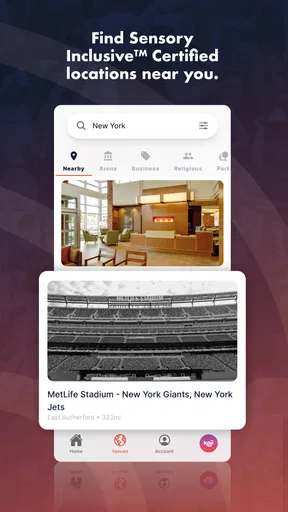
- Helps users identify sensory-inclusive venues before attending events.
- Venue listings can make planning outings easier for people with sensory needs.
- Useful resource for families
- caregivers
- and individuals with disabilities.
- Promotes awareness of sensory accessibility in public spaces.
- Available information can support more confident event participation.
Cons
- Coverage may vary significantly depending on location and venue participation.
- Some listings may lack detailed
- up-to-date accessibility information.
- The app cannot guarantee that every venue feature meets your needs.
- Event details may depend on external venue or ticketing information.
- Users may still need to contact venues for specific accommodation questions.
FAQs for KultureCity
What is KultureCity and what is the app used for?
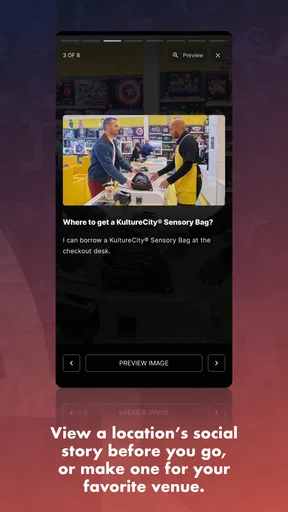
KultureCity is an accessibility-focused app designed to help people find and prepare for sensory-inclusive experiences. It provides information about participating venues, events, and available accommodations, such as sensory bags, quiet areas, and trained staff. The app is especially useful for individuals with autism, PTSD, dementia, or other conditions that may make crowded or noisy environments difficult.
How can KultureCity help me during an event or venue visit?
Before visiting, you can use KultureCity to explore participating locations and learn about their accessibility services. Depending on the venue, the app may explain where to find sensory rooms, quiet zones, or sensory bags containing items such as noise-reducing headphones and fidget tools. This preparation can make the visit less stressful, although available services may differ from one location or event to another.
Is KultureCity free to download and use?
KultureCity is generally available as a free app, allowing users to browse accessibility information without purchasing a subscription. However, individual venues or events may have their own policies regarding sensory bags, reserved areas, admission, or additional services. It is a good idea to check the specific venue details in the app and confirm arrangements directly before attending, especially for large or ticketed events.
Does KultureCity work at every venue and event?
No. KultureCity focuses on venues and events that participate in its accessibility program, so coverage depends on the location and region. Some cities may offer extensive information, while smaller areas may have fewer listings. Even when a venue appears in the app, services can vary by event, date, and operating conditions. Always review the listing and contact the venue if you need specific assistance.
Does KultureCity replace medical or personal accessibility support?
KultureCity is a planning and accessibility-information tool, not a medical service or replacement for personal support. The app can help you understand what accommodations may be available, but it cannot guarantee that every need will be met. Users should continue bringing any essential medication, communication aids, or personal equipment and should contact the venue in advance when detailed accommodations or assistance are required.


